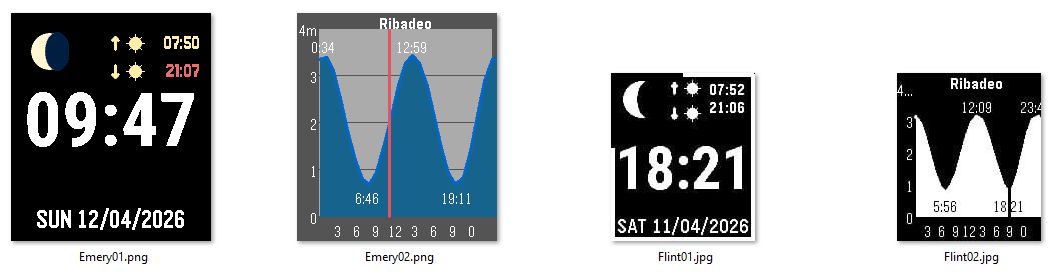
Features
- Current moon phase
- Sun rise and sun set
- Wrist flick for tide prediction screen
- Settings:
- Enable step ring and configure goal (default 10k)
- Enable visual bluetooth alert (current time in red on color pebble, inverted time on black and white)
- Date format (dd/mm/yyyy or mm/dd/yyyy)
- Enable tide screen with wrist flick
- Tide source:
- local database of limited locations
- StormGlass API has a free tier that allows for 10 calls (watch stores current tide data and only calls API if older than a day)
- location can be auto detected or manually configured
Change Log
- v0.0.0 06/04/2026 Initial version created with Claude and Pebble Watchface Generator Skill (https://github.com/coredevices/pebble-watchface-agent-skill)
- v0.0.1 07/04/2026 got tides working with shake
- v0.0.2 08/04/2026 worked on improving tide screen and time screen
- v0.0.3 09/04/2026 worked on time screen: moon phase are now images, sun rise and set aligned and with easier to see icons, renamed to MoonSunTide
- v0.0.4 10/04/2026 added step ring and ability to set target / disable steps in config. added option to configure date format in settings.
- v0.0.5 11/04/2026 added option to use stormglass.io tide predictions via API and added option to auto detect location or manually input.
- Added option for visual notification of loss of bluetooth link.
- added option to disable tide screen (here in madrid not needed) - v1.0.0 11/04/2026 posted to Pebble App store: https://apps.repebble.com/8c5c20fd6e514a4eaa3246b8
Context
Inspired by Tides that I used on my Pebble Time Steel since 2015. Not my first pebble watchface, but the first that I published to the app store. First version was build over five sessions using Claude Code and Eric’s Pebble Watchface Generator Skill, each session lasting until I ran out of credits which was about 20 minutes. More details about the whole process can be found here